.png?width=365&height=73&name=%F0%9F%92%A1EMPLOYEE%20KNOWLEDGE%20BASE%20(2).png)
.png?width=246&height=246&name=Initial%20Post%20%20(6).png)
JUMP TO
Training Overview & Reference Guide
Whether you're a new Site Director preparing to facilitate your first training or an experienced leader looking for a refresher, the presentation below walks through the monthly training process.
It covers preparation, participation, attendance verification, training pay, and responsibilities.
How Monthly Training Works
Site Staff Monthly Training follows a consistent process:
- Course Assigned: Training is automatically assigned to site staff in the Learning Hub on the first of the scheduled training month.
- Site Director Facilitates: Teams participate in the training together during their site meeting.
- Attendance Code Shared: After the session, the Site Director provides the attendance code.
- Learning Hub Completion: Employees confirm their participation and complete the required questions in the Learning Hub.
- Certificate Issued: A completion certificate is generated after successfully finishing the course.
This process helps ensure employees participate in training together while maintaining individual completion records.
Preparing for Your Monthly Training
Site Directors should review the monthly training materials before facilitating their team session.
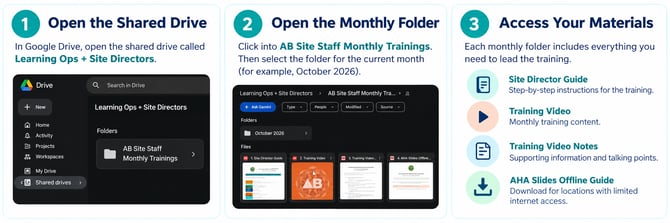
Training resources are located in the Learning Ops + Site Directors shared Google Drive, within the AB Site Staff Monthly Trainings folder.
The monthly information sheet is also available through AB Pulse Shortcuts.
Planning ahead: If your site experiences unreliable internet access, download the training video before the meeting, so your team can participate without interruptions.
Completing Training in the Learning Hub
After participating in the team training, each employee must confirm their attendance through the AB Learning Hub.
Step 1: Find Your Course
- Log in to the Learning Hub.
- Open your user menu.
- Select My Activities, then Courses.
- Locate the Site Staff Monthly Training course for the appropriate month.
Step 2: Confirm Participation
- Select Start Learning Now.
- Confirm that you participated in the site training.
- Enter the attendance code provided by your Site Director.
- Complete the required questions and submit your responses.
Step 3: Confirm Completion
Once the course is completed, download your completion certificate.
Site Directors should also complete their assigned Learning Hub course and confirm that their team members have completed the training requirements.
Important: The attendance code is provided after the facilitated team session. Completing the Learning Hub confirmation is a separate step from participating in the meeting.
Training Pay
Site Staff Monthly Training includes one hour of paid training time for team members.
Site Directors and managers do not need to manually enter this training time for their teams.
No additional payroll entry is required from managers for the standard training process.
Roles & Responsibilities
Site Directors
- Access and review the monthly training materials.
- Facilitate the training with site staff.
- Provide the attendance code after the session.
- Complete their assigned Learning Hub course.
- Confirm team training completion.
Site Staff
- Participate in the facilitated training.
- Access the assigned course in the Learning Hub.
- Enter the attendance code and complete the required questions.
- Confirm that their completion certificate has been issued.
Field & Regional Leaders
- Support Site Directors with training preparation and implementation.
- Reinforce participation and completion expectations.
- Help address questions or challenges.
- Follow up with sites when additional support is needed.
Additional Resources & Support
Training Materials: Learning Ops + Site Directors shared Google Drive → AB Site Staff Monthly Trainings
Monthly Information Sheets: AB Pulse → Shortcuts
Course Completion: AlphaBEST Learning Hub → My Activities → Courses
For questions about training materials, Learning Hub access, or course completion, contact learningops@alphabest.org.
Lead. Learn. Grow. Together.
Site Staff Monthly Training is an opportunity to strengthen our teams, share knowledge, and continue delivering quality experiences for AlphaBEST students and families.