.png?width=365&height=73&name=%F0%9F%92%A1EMPLOYEE%20KNOWLEDGE%20BASE%20(2).png)
This guide helps HR staff and managers ensure new hires are successfully onboarded into both ADP Workforce Now and AB Pulse, completing required tasks and gaining system access without delays.
Read Time: ~3 minutes
Estimated Completion for New Hires: 10–15 minutes
🔹Before Onboarding in AB Pulse, users will...
-
I-9 / New Hire Information Sheet – Verify all details match the Offer Letter.
-
New Hire Entry in ADP WFN – HR enters the new employee into ADP.
-
ADP Registration & Payroll Onboarding – ADP automatically sends a registration email to the new hire to complete payroll onboarding, including policy acknowledgements, banking, tax, and profile verification.
-
Profile Transfer to AB Pulse – Once completed, ADP sends the new hire’s profile information to AB Pulse.
🔹 AB Pulse Overview
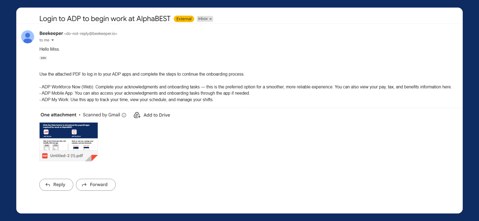
Once a new hire is finalized in ADP, they automatically receive two emails, this includes:
.png?width=381&height=222&name=Untitled%20(4).png)
- Login credentials for AB Pulse
-
Instructions for logging into ADP to begin your onboarding process. This includes guidance on using ADP Workforce Now, the mobile app, and ADP My Work, along with an attached PDF guide containing download links for all required payroll app
Please note: If their login credentials do not work, select “Forgot Password” on the AB Pulse login page. They will receive an email with instructions to reset their account and create a new password.
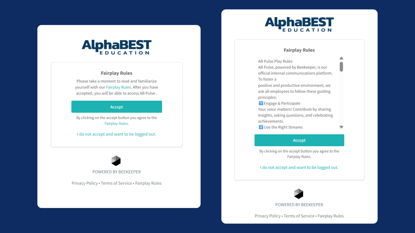
Once they've logged into AB Pulse they'll need to acknowledge our Fairplay Rules.
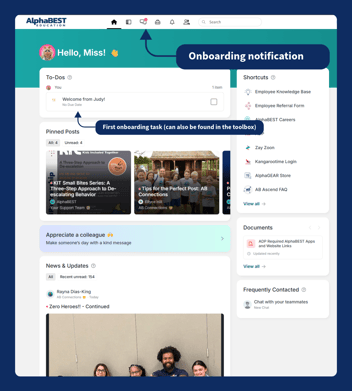
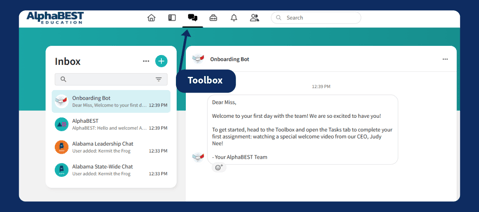
Next, they’ll be directed to the main page, where they can either start their first task directly from the homepage OR open their chat to find a message guiding them to complete their first task in the Toolbox.
OR
📋 Tasks in HR Onboarding
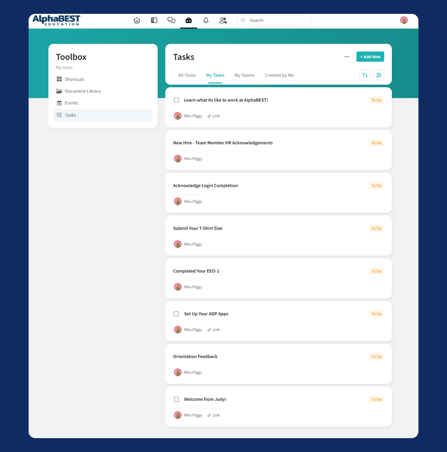
Each new hire will see their assigned tasks under
Toolbox → Tasks → My Tasks.
The onboarding process includes two introductory videos—Learn What It’s Like to Work at AlphaBEST and a Welcome from Judy—followed by tasks for team members to complete HR acknowledgements, the EEO-1 self-identification form, login confirmation, T-shirt size submission, labor poster acknowledgement, and required trainings with on-site training scheduling.
📂 Supporting Resources
All HR reference materials are available under:
Document Library → Team Member Resources (Company-Wide) → AB Tools & Login Instructions
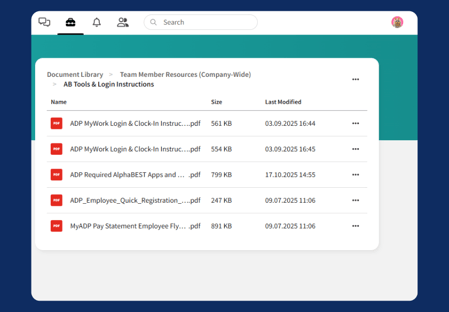
This folder includes:
- ADP MyWork Login & Clock-In Instructions
- ADP Employee Quick Registration Guide
- Links to the required ADP Apps to work at
- MyADP Pay Statement Employee Flyer
HR can direct employees to these documents for troubleshooting or re-downloading app setup instructions.
For Managers
Throughout the process, the Onboarding Bot provides automatic updates to the manager and HR.
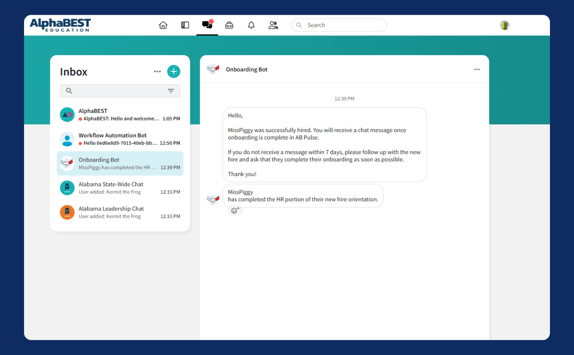
If the manager does not receive a completion message within seven (7) days, they should follow up with the new hire to ensure onboarding tasks have been finished.
The new hire will also receive notifications by email three times, nudging them to complete the onboarding process.
🏁 Completion and Next Steps
Once all HR-related tasks are marked as Done in Toolbox:
- The Onboarding Bot sends a completion notification to the hiring manager.
- The new hire transitions to completion of site level onboarding which includes learning hub and & site-level onboarding (if required).
- HR ensures all acknowledgments and EEO documentation are retained in ADP.
🟢 Quick Reference for HR and Managers
|
Notification |
Sent To |
Trigger |
|
“Successfully hired” |
Manager |
New hire record created in ADP |
|
“HR portion completed” |
Manager, HR |
All HR tasks marked Done |
|
“No completion within 7 days” |
Manager |
Follow-up reminder |
These notifications are sent through chat for managers and to humanresources@alphabest.org.
🔒 Recordkeeping
- All signed forms and acknowledgments are stored in ADP under the employee’s profile.
- The toolbox is used for task tracking only—it is not a records repository.
- HR should verify that each required acknowledgment and EEO form is signed before marking onboarding complete.