.png?width=365&height=73&name=%F0%9F%92%A1EMPLOYEE%20KNOWLEDGE%20BASE%20(2).png)
JUMP TO
Add an Employee Allergy
KangarooTime can store allergy information on an employee profile.
This information is only accessible to the employee and users with the appropriate permissions.
To add an allergy:
- Select Employees.
- Select Profiles.
- Select the employee.
- Select the Medical tab.
- Select Add Allergy.
- Complete the required fields:
- Type
- Name
- Severity
- Reaction
- Care Instructions
- Select Save.
Add a Medical Condition
Medical conditions can also be documented within an employee's profile.
To add a medical condition:
- Select Employees.
- Select Profiles.
- Select the employee.
- Select the Medical tab.
- Select Add Medical Condition.
- Complete the required information:
- Type
- Name
- Risk
- Symptoms
- Care Instructions
- Select Save.
Add an Internal Note
Internal notes can be used to document information on an employee profile.
Only users with the appropriate permissions can view internal notes.
To add a note:
- Select Employees.
- Select Profiles.
- Select the employee.
- Select the Internal Notes tab.
- Select Add Note Thread.
- Complete the required fields:
- Title
- Type
- Note
- Select Save.
View or Update a Note Thread
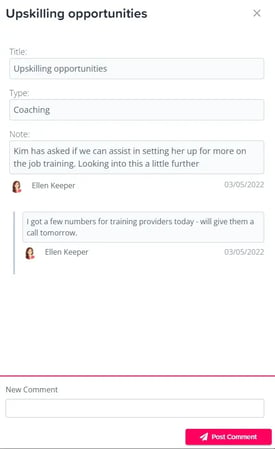
Once a note thread has been created, additional information can be added to the same thread.
- Locate the note thread.
- Select the More icon.
- Select View Note Thread.
- Enter your comment at the bottom.
- Select Post Comment.
Newer comments will appear above previous comments.
Archive a Note Thread
To remove a note thread:
- Select the More icon next to the thread.
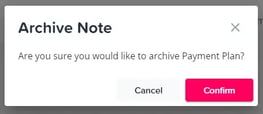
- Select Archive Note Thread.
- Select Confirm.
Archived note threads cannot be restored to the employee account.
Important Reminders
- Medical information and internal notes are restricted to users with appropriate permissions.
- Add only information that is necessary and relevant.
- Double-check information before saving it.
- Archived note threads cannot be restored.
Need Help?
If you cannot access or update employee medical information or internal notes, submit an SMS Request Form.